How to enable the Postscript Integration

Overview
Leverage Friendbuy's integration with Postscript to grow your SMS subscriber lists and seamlessly automate both Referral and Loyalty program customer communications. After setting up the integration, customer profiles will be created in Postscript for any opted-in phone numbers captured by Friendbuy. All available customer data will be added to the Postscript subscriber profiles, including Personalized Referral Links (PURLs), Coupon Codes, Loyalty tier information, and additional Referral and Loyalty program details, which you can then include in your Postscript SMS automations and flows.
You can then use Postscript to send personalized SMS messages to thank an Advocate for sharing, remind them to continue sharing with their unique referral link (PURL), send reward notifications, and engage Referred Friends with personalized offers. This integration enables a powerful customer experience that will automate SMS outreach at scale.
Set Up Integration in Friendbuy
- Log into Friendbuy and navigate to the integrations page by clicking Settings, followed by Integrations.
- Click on the Postscript tile.
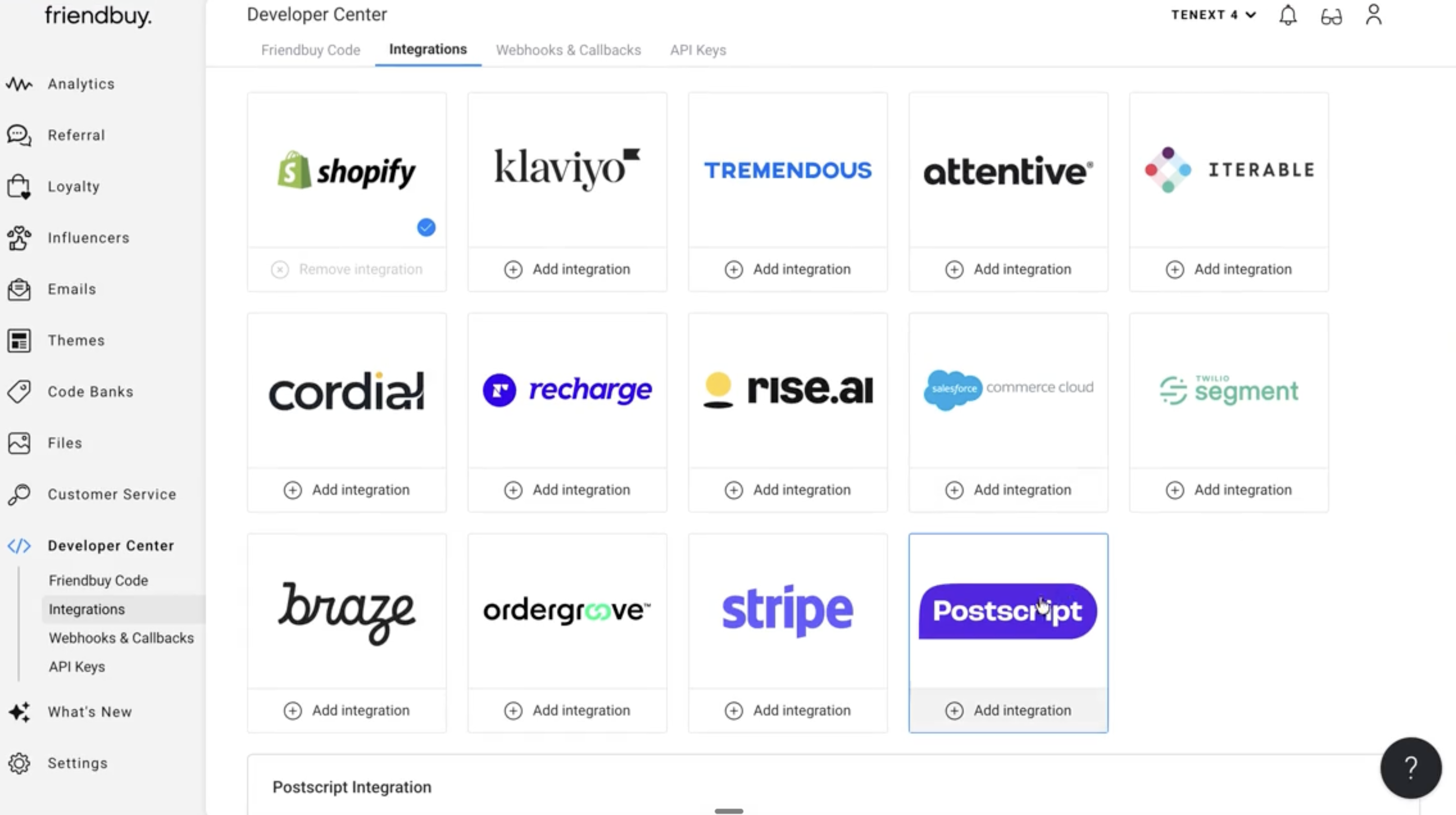
- After clicking Add integration, the Postscript Integration setup panel will open. Complete the following fields:
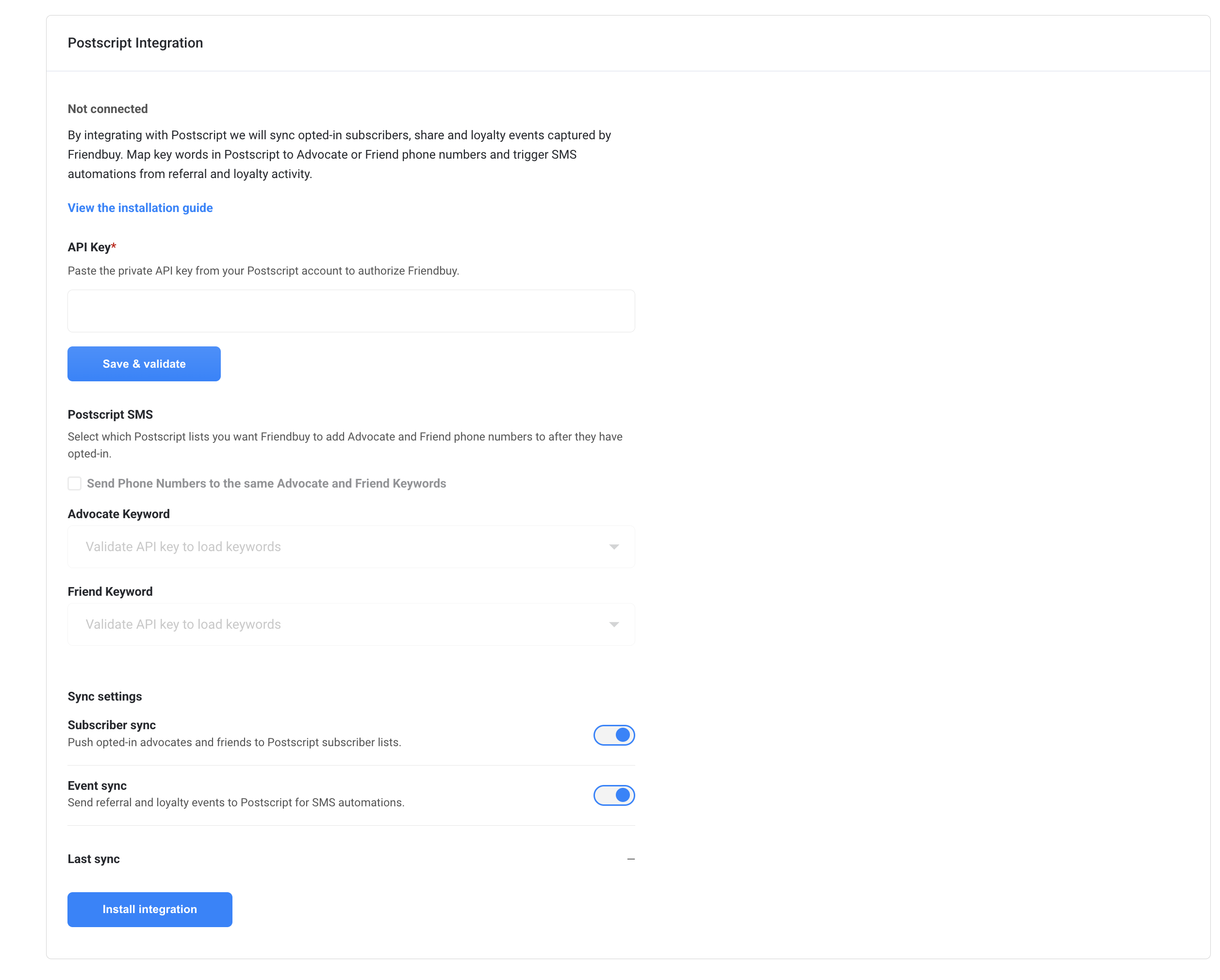
- Once the integration is successfully installed, select which Postscript Keywords or subscriber sources you want Friendbuy to send Advocate and Friend phone numbers to.Keywords or subscriber sources must be set up in Postscript before completing this step. It is best practice to use separate Keywords for collecting Advocate and Friend phone numbers so you can segment them independently in Postscript automations. See additional details below for steps to set up Keywords.
Set Up Keywords in Postscript
Before completing Step 6 above, set up new Keywords in your Postscript account to organize Advocate and Friend phone numbers. Separate Keywords allow you to more easily manage subscribers by their role (Advocate vs. Friend) and segment them accordingly in your Postscript automations.
In your Postscript account, navigate to Settings > Keywords and create new Keywords with the following names:
- Friendbuy Advocates (for Advocate phone numbers)
- Friendbuy Friends (for Friend phone numbers)
Important Consent Handling: Friendbuy respects Postscript's double opt-in (DOI) flow for SMS compliance. When a customer opts in via a Friendbuy widget with the SMS consent box checked, Friendbuy sends their phone number to Postscript, and Postscript triggers its own confirmation process. This ensures your subscribers are fully compliant with TCPA requirements.
How Consent and Compliance Works
Friendbuy's Postscript integration is built with compliance at its core:
- Explicit SMS Opt-in Required: A phone number is only sent to Postscript when a customer has affirmatively checked the SMS opt-in box on the Friendbuy widget.
- TCPA Compliance: Consent metadata required by TCPA (timestamp, source URL, opt-in language version, IP if available) is included with every phone number sent to Postscript.
- Postscript's DOI Process: Postscript's own double opt-in flow is respected and triggered for all subscribers. Friendbuy does not bypass this process.
- No Duplicate Subscribers: Duplicate phone numbers for the same merchant will not create duplicate subscribers in Postscript.
How to See Friendbuy Data in Postscript
Customer data collected in your Referral and Loyalty programs will be added to Postscript subscriber profiles as soon as they interact with your Friendbuy widgets with SMS opt-in. Once a subscriber is synced from Friendbuy, they will appear in your Postscript Conversations view with a full set of Friendbuy properties attached to their profile. These properties are available as personalization variables in any SMS flow or campaign you build in Postscript.
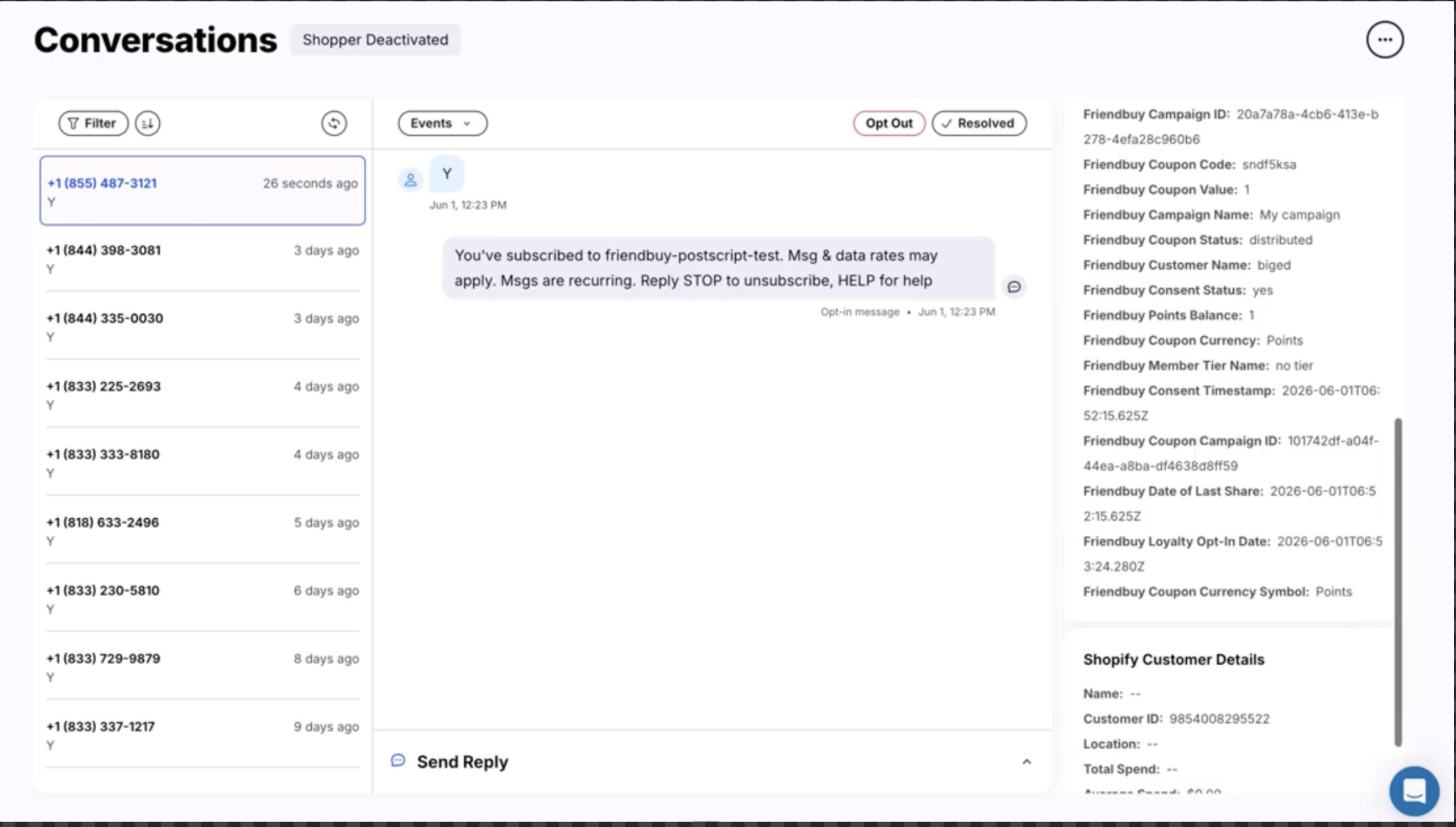
To view a customer's profile in Postscript and see all associated Friendbuy data, navigate to Subscribers in your Postscript dashboard and search for the customer by phone number.
Friendbuy Custom Properties - Referral & Loyalty
The following Friendbuy custom properties appear on Postscript subscriber profiles and are updated whenever the underlying values change:
Referral Program Properties
Custom Property | Definition |
Friendbuy Customer Name | The name the customer entered when submitting their info through a referral widget |
Friendbuy Referral Link | A personal referral link (PURL) generated for an Advocate. Example: https://fbuy.io/EzcW |
Friendbuy Date of Last Share | The date and time the Advocate last shared with a Friend via any share channel |
Friendbuy Campaign ID | The Campaign ID associated with the personal referral link generated for an Advocate |
Friendbuy Campaign Name | The Campaign Name associated with the personal referral link generated for an Advocate |
Friendbuy Coupon Code | The most recent coupon code distributed to the customer |
Friendbuy Coupon Value | The currency value of the most recent coupon code distributed to the customer |
Friendbuy Coupon Status | The status of the most recent coupon code: 'distributed' or 'redeemed' |
Friendbuy Coupon Currency | Currency code (USD, CAD, etc.) or percent (%) associated with the most recent coupon code |
Friendbuy Coupon Campaign ID | The Campaign ID associated with the coupon code distributed to the customer |
Friendbuy Referred Revenue | The total amount of referred revenue from a given Advocate |
Friendbuy Referred Purchases | The number of purchases made from an Advocate's referrals |
$source | Set to 'Friendbuy' to establish profile attribution |
Loyalty Program Properties
Custom Property | Definition |
Friendbuy Customer Name | The name the customer entered when opting into the loyalty program |
Friendbuy Customer Birthday | Birthday entered by customer in a Loyalty enrollment widget |
Friendbuy Member Tier Name | The name of the tier the customer is currently in |
Friendbuy [Merchant Points Label] Balance | Number of points the customer has available to redeem for a reward |
Friendbuy Account Credit Balance | The credit amount a customer has available to spend |
Friendbuy Loyalty Opt-In Date | The date when a customer chooses to enroll in a loyalty program |
$source | Set to 'Friendbuy' to establish profile attribution |
Cumulative Metrics
The following cumulative metrics are maintained and updated on the subscriber profile in Postscript:
- Number of rewards redeemed (lifetime total)
- Number of points redeemed (lifetime total)
- Number of successful receipts uploaded (lifetime total)
Custom Events Sent to Postscript
Friendbuy emits custom events to Postscript so merchants can trigger Postscript Automations and SMS Flows based on Referral and Loyalty program activity.
Referral Program Events
Event | Trigger | Properties |
Friendbuy Referral Share | Advocate shares the referral program offer through the widget via Email, PURL, SMS, or social (Facebook, Messenger, Twitter) | Share channel, Campaign name, Campaign ID, Advocate name |
Friendbuy Referral Advocate Reward Earned | Advocate earns a reward after a referred Friend completes the referral conversion and passes all business rules and fraud checks | Coupon code, Reward value, Currency, Campaign name, Campaign ID, Customer name |
Friendbuy Referred Friend Incentive Earned | Referred Friend completes the referral conversion, passes all business rules and fraud checks, and earns an incentive | Coupon code or gift card, Reward value, Incentive currency, Campaign name, Campaign ID, Referred friend name |
Loyalty Program Events
Event | Trigger | Properties |
Friendbuy Loyalty Reward Earned from a Purchase | Loyalty member makes a purchase, passes all associated earning event rules, and earns a reward | Coupon code, Reward value, Reward currency, Account credit and points, Campaign name, Customer name, Order ID, custom payload attributes |
Friendbuy Loyalty Reward Earned from Joining Program | Loyalty member joins the program, passes all associated earning event rules, and earns a reward | Coupon code, Reward value, Reward currency, Account credit and points, Campaign name, Customer name, custom payload attributes |
Friendbuy Loyalty Reward Earned from Referring a Friend | Loyalty member refers a Friend, passes all associated earning event rules, and earns a reward | Coupon code, Reward value, Reward currency, Account credit and points, Campaign name, Customer name, custom payload attributes |
Friendbuy Loyalty Reward Earned from a Sign Up | Loyalty member completes a designated sign up event, passes all associated earning event rules, and earns a reward | Coupon code, Reward value, Reward currency, Account credit and points, Campaign name, Customer name, custom payload attributes |
Friendbuy Loyalty Reward Earned from a Custom Event | Loyalty member completes a custom-defined event, passes all associated earning event rules, and earns a reward | Coupon code, Reward value, Reward currency, Account credit and points, Campaign name, Customer name, Name of custom event, custom payload attributes |
Friendbuy Member Tier Changed | Loyalty member's tier has changed | Friendbuy Member Tier Name, custom payload attributes |
Receipt Processing Events
Receipt data is sent to Postscript whenever a receipt status changes to either 'approved' or 'rejected', regardless of whether the approval or rejection was performed manually or automatically.
Receipt Event Data
Each receipt processing event includes the following data points:
Data Field | Data Type | Description |
event | String | Event type (e.g., 'receipt.processed') |
data.id | String | Unique receipt identifier |
data.customerId | String | Unique customer identifier |
data.email | String | Customer email address |
data.submissionDate | String | Receipt submission datetime (ISO8601 format) |
data.purchaseDate | String | Actual purchase date and time from receipt |
data.storeId | String | Merchant store identifier |
data.storeName | String | Merchant store name |
data.amount | Number | Total transaction amount |
data.status | String | Receipt status (approved/rejected) |
data.rewardStatus | String | Reward system status |
data.imageUrl | String | Temporary secured image URL |
data.rejectionReason | String | Reason for rejection (if applicable) |
data.products | Array | List of purchased products |
meta.eventId | String | Unique event delivery identifier |
meta.timestamp | String | Event emission datetime (ISO8601 format) |
Building Postscript Automations with Friendbuy Data
Once the integration is live and you're receiving Friendbuy data, you can build powerful Postscript Automations and SMS Flows triggered by Friendbuy events. Here are some common use cases:
Send Advocate Reward Notifications
Create an automation triggered by the Friendbuy Referral Advocate Reward Earned event. Include the coupon code in your SMS using merge tags and congratulate the Advocate on their reward.
Remind Advocates to Share
Create a flow triggered by the Friendbuy Referral Share event to send a follow-up SMS encouraging Advocates to continue sharing, including their personalized PURL.
Welcome Loyalty Members
Create an automation triggered when a customer opts into your loyalty program. Send a welcome SMS that includes bonus points or a special offer, merged from Friendbuy data.
Tier Upgrade Celebrations
Create a flow triggered by the Friendbuy Member Tier Changed event to celebrate when customers reach a new loyalty tier, include their tier name and new benefits.
Friend Incentive SMS
Create an automation triggered by the Friendbuy Referred Friend Incentive Earned event to send the referred Friend their coupon code and redemption instructions.
Disconnecting the Integration
If you need to disconnect Postscript from Friendbuy at any time:
- Navigate to Settings > Integrations in your Friendbuy account.
- Click the Postscript tile.
- Click Disconnect Integration.
- Confirm the disconnection.
Once disconnected, no further subscriber data, events, or properties will be sent to Postscript. The stored credential will be revoked. If you reconnect later, Friendbuy will not create duplicate subscribers or events in Postscript.
Troubleshooting
"Installation Failed" Error
If you receive an error during installation, verify that:
- You are logged into the correct Postscript account
- Your Postscript account has API access enabled
- You have admin permissions in both Friendbuy and Postscript
Phone Numbers Not Appearing in Postscript
Verify that:
- Customers are checking the SMS opt-in box on your Friendbuy widgets
- The Keywords or subscriber sources you selected in Step 6 are correctly configured in Postscript
- Sufficient time has passed for the sync to complete (typically a few minutes)
Duplicate Subscribers
Friendbuy's integration is designed to prevent duplicate subscribers. If you see duplicates:
- Verify that the same phone number is not being sent from multiple campaigns
- Check your Postscript list settings to ensure deduplication is enabled
- Contact support@friendbuy.com for assistance
Missing Custom Properties
Custom properties may not appear immediately if:
- The customer profile is brand new in Postscript
- The customer hasn't yet completed the actions needed to populate those properties (e.g., the "Date of Last Share" property only appears after an Advocate shares)
- The integration has not yet synced the latest data
Frequently Asked Questions
Q: Do I need email addresses to use the Postscript integration?
A: No. The Postscript integration focuses on SMS. Email addresses are optional and only sync if the customer provides them in a Friendbuy widget. The primary sync target is phone numbers for SMS subscribers.
Q: What happens if a customer changes their phone number in Postscript?
A: Postscript is the system of record for subscriber contact information. If a customer updates their phone number directly in Postscript, Friendbuy will not overwrite it. New data from Friendbuy (properties and events) will continue to be associated with the subscriber in Postscript.
Q: Can I send Advocate and Friend phone numbers to the same Postscript Keyword?
A: Yes, you can map both to the same Keyword, but it's recommended to use separate Keywords so you can segment Advocates from Friends independently in your Postscript automations and flows.
Q: What happens if my Postscript API goes down?
A: Friendbuy includes built-in retry logic to handle temporary outages. If the Postscript API remains unreachable, failed events and subscriber syncs are logged for visibility and can be retried without manual intervention from the merchant.
Q: How long does it take for data to sync to Postscript?
A: Most subscriber data and events sync to Postscript within a few minutes of the customer action in Friendbuy. Custom property updates may take slightly longer if there are bulk updates occurring.
Q: Can I modify Friendbuy custom property names in Postscript?
A: No. Custom property names are standardized across all merchants to ensure consistency. However, you can display them with custom labels within your Postscript automations and flows.
Q: What if I have Postscript SMS enabled and another SMS Friendbuy-integration provider?
A: Customers may receive SMS messages from both providers if both integrations are active. Manage your SMS opt-in settings and Keywords carefully to avoid duplicate messaging.
Q: Is the Postscript integration TCPA compliant?
A: Yes. The integration enforces explicit SMS opt-in, includes TCPA-required consent metadata with every subscriber sync, and respects Postscript's double opt-in (DOI) process.
Need Help?
If you have questions about setting up or using the Postscript integration, feel free to contact your Customer Success Manager or reach out to support@friendbuy.com.