Getting Started with Friendbuy
Getting Started with Referral
Plan Your Referral Program Implementation Team
Merchant SDK Setup with Google Tag Manager
How to Join Your Team on Friendbuy
Best Practices
Referral Program Placements
Friendbuy Referral Emails
Driving Referral Program Awareness
Referral Offer Strategies
Limited-Time Offer Promotions in Referral
Referral Contests, Sweepstakes and Giveaways
A/B Testing Best Practices
Account Management
How can I invite my team to the Friendbuy platform?
Managing Your Account Settings
How to Set Up and Change Your Email Sender
Referral Campaign Management
Widgets
How to Create a New Theme
How to Make Changes to a Theme
Widget & Email Image Specifications
How to Apply Theme Changes to a Widget
How to update a Widget or Theme to the latest version
How to Set Up a Ribbon
How to Set Up an Advocate Landing Page
How to Set Up a Friend Landing Page
How to Set Up a Post-Purchase Overlay
How to Set Up an Account Page Widget
How to configure your Terms & Conditions
How to Test a Widget
How to Set up a Self-Referral Overlay
How to Set Up a Customer Dashboard
How to Personalize Your Widgets with the Advocate name
Character Count Recommendations
Campaign Settings
How to Create a New Referral Campaign
How to set up Referral Code Personalization for PURLs
Setting Up an Advocate Reward
Setting Up a Friend Incentive
Shopify Coupon Codes Integration
How to Run an A/B Test
How to Change Your Referral Offer
Setting Up Max Clicks for Referral Links
How to Generate Personalized URLs (PURLs) through Our API
How to Generate Personalized URLs (PURLs) for Advocates
How to Configure Tiered Rewards
How to Archive a Referral Campaign
Understanding A/B Test Analytics
How to Duplicate Your Campaign
How to Set Up a Redirect for Limited Time Campaigns
How to Create a Product Sharing Referral Campaign
How to set up Code Based Sharing
Code Banks
How to Create a New Code Bank
How to Generate Coupons in Bulk for Shopify
Setting Up Low Code Bank Notifications
How to Add Codes to an Existing Code Bank
Emails
Email Types for Your Referral Program
How to Add DNS Records for Email Sender Verification
How to Create, Edit, and Manage Emails
How to set up an Expiration Reminder email
How to Assign an Email to a Campaign
Referral Reward Store
Regional Restrictions: Block Your Referral Program in Specific Countries
Generate a QR Code for a Referral Link (API)
Store Credit Rewards for Referral (Shopify Integration)
Loyalty Program Management
Uploading Data From a Legacy Loyalty Program
How to Set Up Purchase Based Member Tiers Program
How to Set Up a Points-Based Member Tier Program
How to Set Up Points Redemption Options
How to Set Up Shopify Coupon Code Integration in a Loyalty Earning Event
How to Set Up a Loyalty Opt-in CTA
Understanding the Loyalty Analytics
Manually Reward Customers via CSV Upload
Rolling Points Expiration Reminder Emails
Manually Opt a Customer In or Out of Loyalty
Receipt Scanning for Loyalty
How to Display Loyalty Points on a Product Detail Page (PDP)
How to Create an Earning Event
Cashback Rewards for Loyalty (Shopify Integration)
How to Configure an Earning Event in your Loyalty Program
How to set up expiration for Points or Account Credit
How to Set Up the Loyalty Progress Bar Widget
How to Create, Edit, and Manage Loyalty Emails
Integrations
Attentive Integration
Send a Triggered Text to Prompt a Referral After a Positive Review with Attentive and Okendo
Automatically Prompt a Referral Post Purchase in Attentive
Send Referral Program Text Messages Through Attentive
How to Text Coupon Codes to Advocates using Attentive Journeys
Make it Easy for Advocates to Refer by Sending Their PURL Through SMS using Attentive Journeys
How to Send Advocates a Reminder Text to Redeem Their Coupon Codes through Attentive Journeys
How to Send Referred Friends a Reminder Text to Redeem Their Coupon Codes through Attentive Journeys
How to reward Loyalty Members for signing up for Attentive text messages and emails
How to Include a Customer's Loyalty Points Balance in an Attentive Text
How to Send a Coupon Code to a Referred Friend using Attentive Journeys
How To Enable the Attentive Integration
Braze Integration
How To Enable The Braze integration
How to Send One Time Emails with Referral Links through Braze
How to Send Referral Links Post Purchase Through Braze
How to Email Coupon Codes Through Braze to Advocates and Friends After They Are Distributed by Friendbuy
How to Promote Your Referral Program via SMS (Through Braze)
How to Trigger a Text to Remind Advocates to Redeem Referral Rewards (Through Braze)
How to Trigger a Text to Remind Referred Friends to Redeem Their Incentives (Through Braze)
How to Send Coupon Codes Through Braze SMS to Advocates and Friends After They Are Distributed by Friendbuy
How to Prompt a Referral After a Positive Review with Friendbuy and Trustpilot (via Braze)
Cordial Integration
DataGrail Integration
Ethyca Integration
Fivetran Integration
Iterable Integration
Trigger a Direct Mail Campaign to Drive Referral Program Awareness (Friendbuy x Iterable x Poplar)
How to Enable the Iterable Integration
How to Automatically Text Referred Friends their Coupon Code with Iterable Journeys
How to Prompt a Referral After a Positive Review with Friendbuy and Trustpilot (via Iterable)
Increase Referral Program Awareness with a Dedicated Email Blast through Iterable Journeys
Klaviyo Integration
How to send Referral Links Post Product Review (Yotpo + Klaviyo)
How to Prompt a Referral After a Positive Review with Friendbuy and Trustpilot (via Klaviyo)
How to send one time emails with referral links through Klaviyo
How to Send Referral Links Post Positive Product Review (Okendo + Klaviyo)
How to Send Referral Links Post Purchase through Klaviyo
How to Promote Your Referral Program via SMS (Through Klaviyo)
How to Enable the Klaviyo Integration
How to Distribute a Reward To Your Loyalty Members on Their Birthday (Through Klaviyo)
How to Send a Customer their Loyalty Points Balance Through Klaviyo
How to Email Coupon Codes Through Klaviyo to Advocates and Friends After They Are Distributed by Friendbuy
How to Reward Customers for Providing a Review Through Yotpo via Klaviyo Through Your Loyalty Program
How to Send Reminder Texts to Redeem Loyalty Rewards Through Klaviyo
Upgrading to Klaviyo OAuth with your Friendbuy Integration
How to Reward Customers for Providing a Review Through Okendo via Klaviyo Through Your Loyalty Program
How to Trigger a Text to Remind Advocates to Redeem Referral Rewards (Through Klaviyo)
How to Trigger a Text to Remind Referred Friends to Redeem their Incentives (Through Klaviyo)
How to Send Coupon Codes through Klaviyo SMS to Advocates and Friends After They are Distributed by Friendbuy
How to Reward Customers For Subscribing to Klaviyo Emails and Texts Through Your Loyalty Program
How to Segment Customers Based on Tier Status in Klaviyo
How to Reward Customers for Providing a Review Through Stamped via Klaviyo Through Your Loyalty Program
Kustomer integration
Ordergroove Integration
Recharge Integration
Friendbuy Recharge Integration: Renewal Milestone Rewards
How to Enable Friendbuy's integration with Recharge
Salesforce Commerce Cloud
Segment Integration
How to Integrate Friendbuy as a Segment Source
How to set up the Segment Web-Mode (Destination Actions) Integration
Shopify Integration
How to Enable the Shopify Integration
Shopify Checkout Extensibility
Checkout Extensibility - Shopify Pixel Tracking
Shopify Theme App Embed
How to Add the Friendbuy Referral Widget and Referral Dashboard to Shopify Customer Accounts
How Friendbuy Powers Loyalty Point Refunds with Shopify
How to Integrate Friendbuy with Shopify POS for Loyalty and Referral
Tango Card Integration
Tremendous Integration
How to Integrate Your Friendbuy Loyalty and Referral Program with Rise.ai to Issue Stackable Gift Cards and Account Credit
How to enable the Postscript Integration
Friendbuy + Stripe Integration (Referral Program)
How to Integrate with Ordergroove
Configuring the Friendbuy MCP in Claude and ChatGPT
Fraud Prevention
How to Block a Referral Code
How to Block an Email Address
Fraud Settings and Business Rules
Configuring a Global Reward Allowance
Configuring a Referral Link Fallback URL
How the Similar Email Address Fraud Check Works
Customer Service Portal
How do I check the status of a referral?
Customer Profile Name Updates from Widget Submissions
How to Manually Add or Remove Credit / Points to a Customer's Account
Why was my customers reward rejected?
The Referred Friend put in their email address but didn’t get their coupon code. How do I find this?
Resend Reward Email
Override a Rejected or Pending reward
How to Search for a Customer Profile
How to Search for a Customer’s Referral Link in the Friendbuy Platform
How to create a Manual Referral
Why didn't the Advocate receive a Reward for a successful referral?
Reasons for Rejected Advocate Rewards and Friend Incentives
Analytics & Reports
Performance Overview
Reports
Mark purchases as "Test" to maintain clean reporting
Top Advocates Report
Scheduled Reports
Account Credit or Points Statement Export
Exporting Reports from Friendbuy
Email & SMS Report
Advocate Rewards Report
Purchases Report
Friend Incentives Report
Understanding the Codes Report
Dashboards
Referral Performance Analytics Dashboard
Advocate Referral Widget Source Tracking
Referral Analytics Dashboard Overview Metrics
Advocate Reward Email Analytics
Loyalty Email Analytics
Common FAQs
What does Fraud Protection do?
How to Access my Billing Information
What is a typical referral flow?
How to Apply Theme Changes to a Widget
Difficulty downloading reports after you receive an export email?
What are Fraud Checks, Tier Checks, and Rules Checks in the Rewards Report?
How do I change my password?
What is a self-referral redirect URL?
What do the Reward Statuses and Definitions mean?
How to Create a New Theme
What is a Friend Widget?
How are Conversions Tracked in Friendbuy?
A Glossary of Terms
How long is the Referred Friend attribution window
Common Scenarios and Troubleshooting Steps
Developer Documents
Influencer Program Management
- All Categories
- Referral Campaign Management
- Store Credit Rewards for Referral (Shopify Integration)
Store Credit Rewards for Referral (Shopify Integration)

Overview
Store Credit gives you a powerful new way to reward your Advocates: credit that's automatically issued to their Shopify account when a Friend they referred makes a purchase.
With Store Credit, your Advocates can earn a percentage or fixed dollar amount of their referred Friend's order back as credit, no coupon codes or manual payouts required. This integrates directly with Shopify's Account Credit system, so Advocates can view and redeem their credit right through Shopify's built-in checkout experience.
How to Enable Store Credit in Shopify
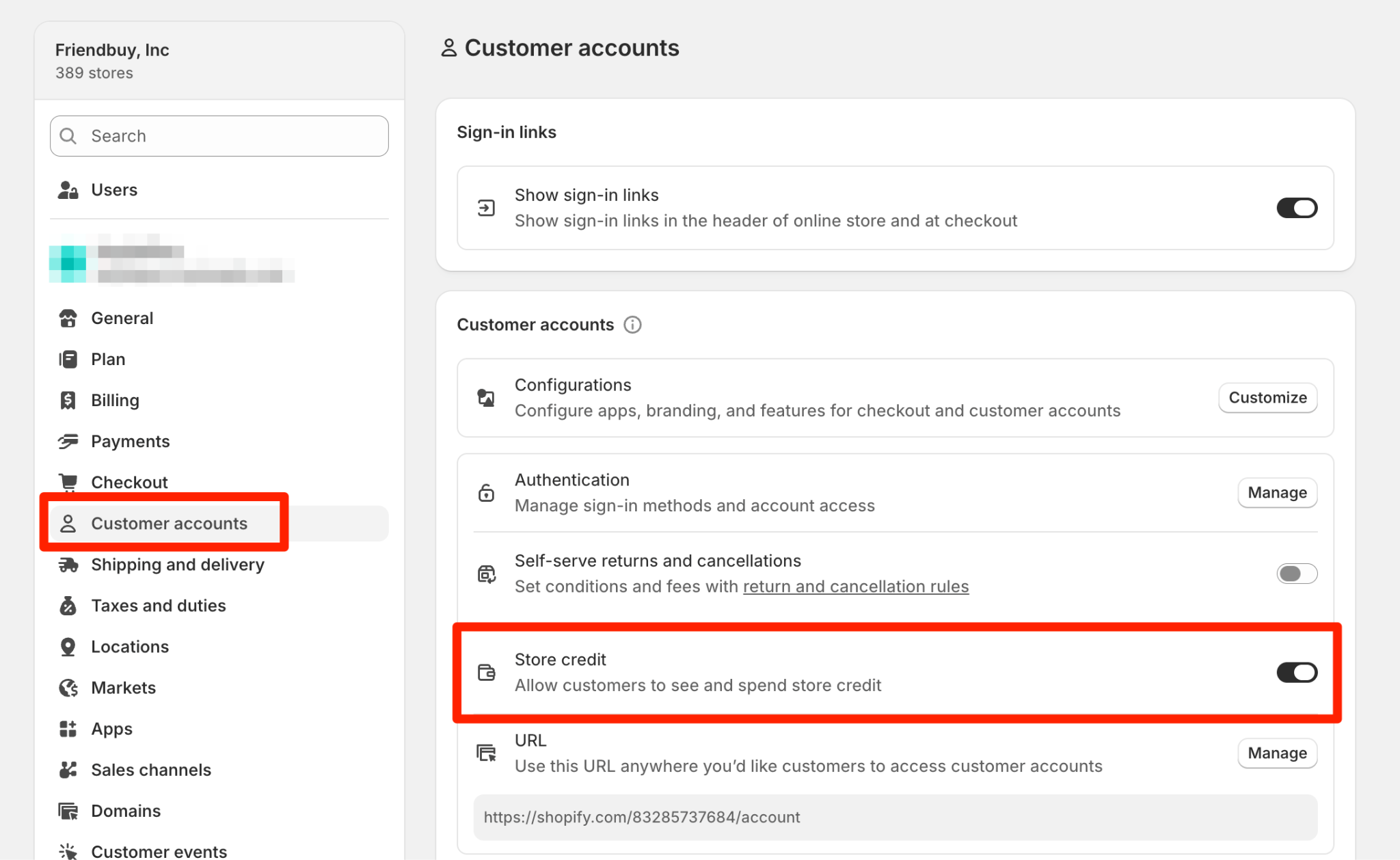
- Login to your Shopify admin
- Navigate to Settings > Customer Accounts
- Toggle Store Credit ON
How Store Credit Rewards Work
When a customer refers a Friend and that Friend completes a purchase, the Advocate can earn a reward that's automatically issued as Shopify store credit.
That credit appears in the Advocate's Shopify account and can be redeemed the next time they shop directly through Shopify's normal checkout flow.
Example
- Advocate refers her friend using their referral link.
- Referred Friend makes their first purchase for $100.
- The Advocate’s Reward is configured to give 10% back as store credit.
- Advocate earns $10 in store credit, automatically added to their Shopify account.
Reward Types
You can configure Store Credit in two ways:
Reward Type | Description | Example |
Fixed Amount | A set amount of store credit earned per qualifying referral. | $10 in store credit for every successful referral |
Percentage-Based | A percentage of the referred Friend's order subtotal (before tax and shipping). | 10% of the Friend's order given back as store credit |
Setting Up Store Credit Rewards in Friendbuy
- Navigate to Referral and select Edit for an existing Campaign, or create a new one.
- Select the Advocate Reward tab from the top menu bar.
- Under Reward Settings, open the How will you reward your Advocates? dropdown and select Store Credit (Shopify).
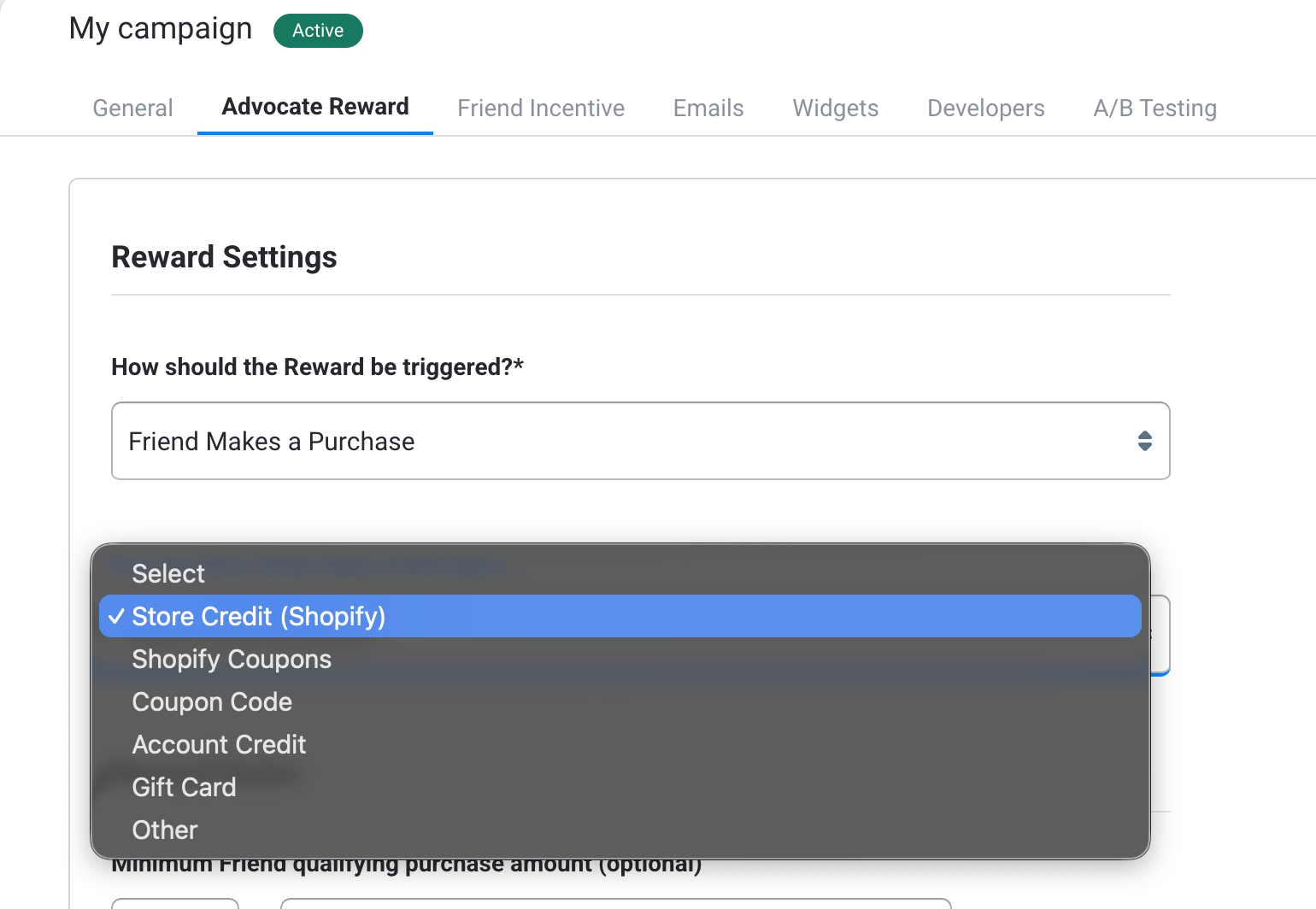
- Choose the trigger event for the reward: Friend Makes a Purchase.
- Configure how the store credit is calculated:
💰 Gift to Be Applied
This dropdown determines how store credit is calculated when an Advocate earns a reward:
- Fixed Amount: Advocates earn a set dollar value in store credit for each qualifying referral.
Example: Give $10 in store credit per referral. - Subtotal Percentage: Advocates earn a percentage of their Friend's order subtotal as store credit.
Example: Give 10% back on the Friend's order subtotal (pre-tax, pre-shipping).
💵 Enter Value
In the field next to the dropdown, enter the amount or percentage for the store credit reward.
- If you selected Fixed Amount, enter a dollar value (e.g., 10).
- If you selected Subtotal Percentage, enter a numeric percentage (e.g., 10 for 10%).
⏰ Expiration Settings
You can set an expiration period for the issued store credit. Enter a number (e.g., 6) and choose a time unit (e.g., Month(s)). This determines how long the store credit remains valid after being earned.
- Enable a Reward Delay as a security measure, so a Friend can't make a large purchase, cancel it, and let the Advocate keep the store credit anyway. We recommend delaying the reward until after your standard returns/cancellation window closes.
- Enable the setting Friendbuy will validate referred Friend Purchases with Shopify (recommended) so Friendbuy automatically confirms the Friend's order with Shopify to account for cancellations or returns before issuing credit.
- Click Save (if your campaign isn't live yet) or Publish Changes (if it is).
Customer Experience
Earning Store Credit
Advocates earn store credit once their referred Friend completes a qualifying purchase. After the order is validated, the credit is added to the Advocate's Shopify customer account following the configured Reward Delay if set.
Redeeming Store Credit
Advocates can:
- Log into your store using Shopify's New Customer Accounts.
- View their store credit balance in their account.
- Redeem available credit directly at checkout, Shopify automatically applies it through the native redemption UI.
Notifications
Friendbuy will send your standard Advocate Reward email, including the store credit amount earned. If you've configured an expiration period, you can include it in the email using the merge variables {{reward.expiration.interval}} and {{reward.expiration.chronology}} (e.g., "This credit expires in 6 months"). Make sure you have an Advocate Reward Email configured for your campaign.
Manually Rewarding Store Credit
- If a referral isn’t attributed automatically, you can create a Manual Referral in the Customer Service tool. Manual referrals work with Store Credit rewards.
Stores Selling in Multiple Currencies
- Shopify holds store credit separately for each currency. Credit issued in one currency appears as its own balance and only displays at checkout when the customer is shopping in that currency. For example, an Advocate who earns CAD store credit will not see it at a USD checkout.
- If your store sells in more than one currency, for example through Shopify Markets, make sure store credit is issued in the currency your Advocates will shop in.
Limitations
- Available only for Shopify Plus stores.
- Requires Shopify's New Customer Accounts. Store credit is not compatible with classic accounts at this time.
- Store Credit is only available for the Friend Makes a Purchase trigger.
- The Advocate must have a registered Shopify customer account to receive store credit. If the Advocate does not have a Shopify account, credit cannot be issued, regardless of which email they used in the widget.
- Order refunds and adjustments are handled by Shopify, not Friendbuy.
- Rewards are issued as Shopify store credit only (not cash payouts or external gift cards).
- Store credit is issued in a single currency. Credit issued in a different currency than the customer’s checkout currency will not display at checkout.